Recharges
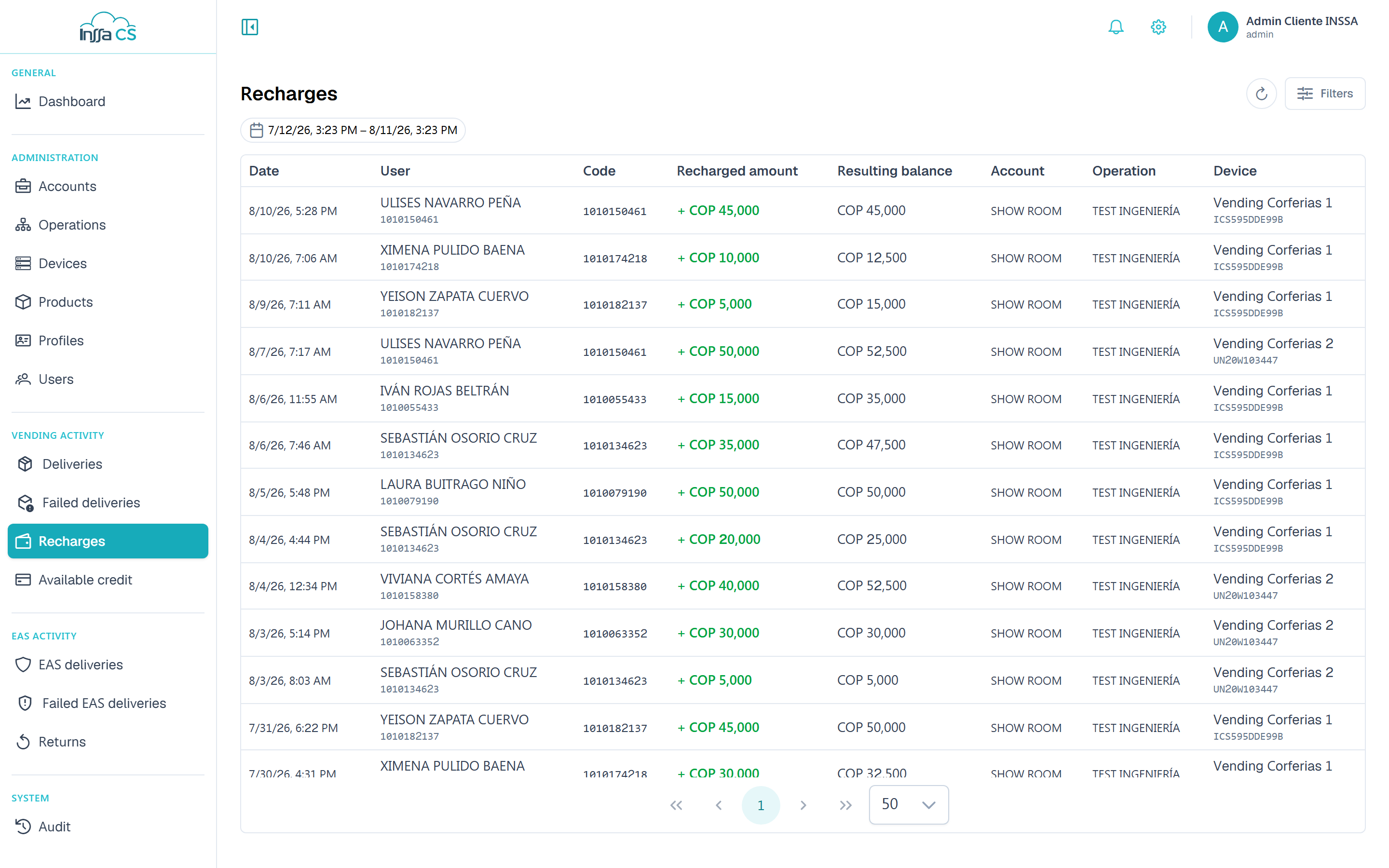
History of the top-up balance: money the user loads onto their code, distinct from the subsidy credited by the profile (see Balances).
Summary
The cards at the top summarise what is filtered: Top-ups (how many) and Amount added (what was loaded, one card per currency when there are several).
Columns
| Column | What it shows |
|---|---|
| ID | The top-up's identifier. Hidden by default: turn it on under Columns. |
| Date | When the top-up happened. |
| User | Code holder. |
| Code | The code topped up. |
| Recharged amount | Value loaded. |
| Resulting balance | Top-up balance after the operation. |
| Account / Operation / Device | Where it happened. |
Search and filters
The Search in table... box (in the table toolbar; on mobile, above the list) matches free text against the recharges loaded: id, account, operation, device, user, ID number, code and user tags.
In the Filters panel: date range (Today · Last 7 days · Last 30 days · This month · custom), account, operation, device, Code and User (by identification).
Typical uses
- Confirm a top-up landed: filter by code and check Resulting balance.
- Reconcile an operation's cash for a period.
- Settle a balance complaint: compare the last top-up here with the Recharge balance in Available balance.
Automatic profile credits are not top-ups. Their trace is the Cashless balance and the Last subsidy date in Available balance.