Licenses
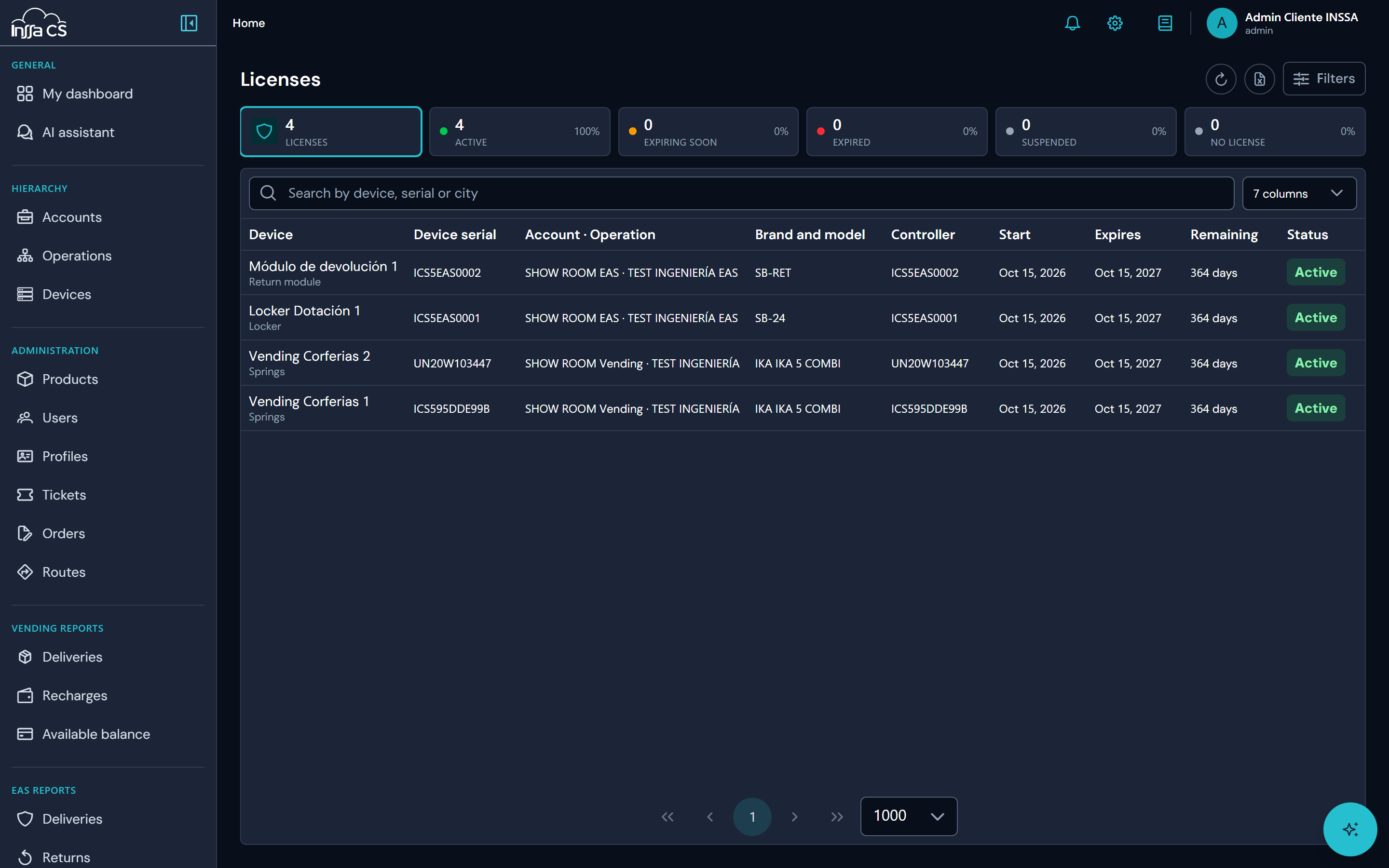
One row per device, with the license validity of its controller: when it starts, when it expires and how many days are left.
This is for looking, not managing. There is no button here that charges or extends a validity.
The license belongs to the controller, not the device
What is licensed is the controller —the board that talks to the platform— and the device inherits its validity. Hence a device with no controller shows as No license: there is nothing to expire.
See Devices.
Statuses
| Status | What it means |
|---|---|
| Active | Live, with more than 30 days ahead. |
| Expiring soon | 30 days or fewer left. This is the cue to arrange the renewal. |
| Expired | Past the expiry date. |
| Suspended | Suspended by hand from administration. It overrides the date: a suspended license reads as suspended even if its validity is still running. |
| No license | The device has no controller, or its controller carries no license. |
The license runs in whole days, Bogotá time: it starts at 00:00:00 on the start date and expires at 23:59:59 on the end date, so the last day counts in full. That is why Start and Expires show the date only, with no time, and the day does not shift with your time zone.
The Remaining column counts the days left: Expires today on the day itself and Overdue by N days once it has passed.
Above the table sit six cards: Licenses (the total), Active, Expiring soon, Expired, Suspended and No license. Tapping one filters the table by that status. The list starts with the licenses closest to expiring.
Columns
| Column | What it carries |
|---|---|
| Device / Device serial | The device and its serial. A deactivated device is flagged device inactive. |
| Account · Operation | Where it sits, so you can place it without leaving the list. |
| Brand and model | Of the device. |
| Controller | The serial of the controller providing the license. Empty if there is none. |
| Start / Expires | The validity period. |
| Remaining | Days left, or how long it has been expired. |
| Status | The five above. |
Filters
The Filters panel narrows by license status, device type, account and operation. Search is by device, serial or city.
With no results: No licensed devices in your scope; with filters on, No results match these filters. Export to Excel downloads the table as you see it.
Permissions
| Action | Permission |
|---|---|
| See the section | licenses:read |
It is a permission of its own, not devices:read: seeing the devices and seeing what is paid for them
are two different things, and you have to be able to grant the first without the second. Without the
permission, the entry does not appear in the avatar menu.
See Permissions.